
If you've read our last post on writing a good system prompt, you already know what goes into the LLM call. This post is about everything that happens around it — the pipeline that turns raw audio or a typed message into a grounded, on-brand reply, and routes it to a ticketing system, a calendar, or a CRM along the way.
Correcting our own earlier docs
Our original content calendar described the pipeline as "5 built-in steps: STT → intent detection → knowledge retrieval → LLM response → TTS." That undersells it in one direction and overstates it in another. There are 27 registered built-in steps today, not 5 — and the generic intent_detection step isn't actually used by any default workflow, including General Assistant agents. Every vertical ships its own dedicated intent step instead (customer_support_intent_detection, sales_intent_detection, and so on). We checked workflowRunner.js and agentRuntimeProfile.js directly rather than trust the old write-up, and we're keeping that "verify against the source" habit for this whole post.
1. The mechanism: an ordered array, not a graph
A Workflow.steps value is a flat, ordered array — ["speech_to_text", "knowledge_retrieval", "llm_response", "text_to_speech"] — and position in that array is the execution order. There is no branching node-graph underneath it. The only conditional primitives are a per-step skipIf (skip this step if a context field matches) and a newer condition + nextStepOnTrue/nextStepOnFalse jump. That's also why the dashboard's pipeline editor is a single reorderable chain and not a canvas — building a node-graph UI on top of a runtime that can't execute branching would be a UI that lies about what it controls.

How the turn pipeline is actually assembled: the minimal default, a real vertical example pulled from the live dashboard, and the three conditions that change the step array itself.
2. The step-by-step breakdown (with the parts the calendar entry skipped)
speech_to_text skipped entirely on Chat agents
For audio turns it calls aiGateway.speechToText() (Whisper on OpenAI, Saarika v2 on Sarvam) and then runs the raw transcript through three filters before it's trusted: a Whisper-hallucination check, an echo-of-the-agent's-own-reply check, and a confidence check (STT_CONFIDENCE_THRESHOLD, default 0.45). Any of the three sets ctx.skipPipeline = true — the turn is silently dropped, not answered with "sorry, I didn't catch that." For typed input, the step only rejects genuinely empty/whitespace text — a bug fix removed an earlier heuristic that was also flagging ordinary typed sentences ending in a preposition ("…reach out to") as suspiciously incomplete and discarding them with zero reply.
intent_detection registered, but unused by any default workflow
This is the one real surprise. The step exists, is fully implemented (a one-shot classifier into greeting/question/purchase_intent/complaint/farewell/other), and is listed as an available step in the pipeline editor — but no default workflow, General Assistant or any of the 12 verticals, actually includes it. Every vertical ships its own purpose-built intent step instead (sales_intent_detection, hr_intent_detection, legal_intent_detection, …), because a generic six-label classifier isn't useful for "is this a leave-balance question or a payroll question." You'd only ever see the generic step if you add it by hand in Advanced Pipeline, or inherit it from a Workflow row saved before your vertical had its own intent step.
knowledge_retrieval reconciled automatically from agent.knowledgeBaseId
Strips filler words ("um," "basically," "you know"), skips the vector search entirely for short small-talk turns ("thanks," "ok," "bye"), and otherwise searches Qdrant with a score floor — RAG_MIN_SCORE (default 0.3), or the knowledge base's own minScore override — and a default topK of 4 chunks, deduplicated by Jaccard similarity above 0.85. Optional env-flagged upgrades exist but are off by default: HyDE query rewriting (RAG_HYDE), multi-query paraphrase fan-out (RAG_MULTI_QUERY), and MMR re-ranking for diversity (RAG_MMR). You never need to add or remove this step by hand — reconcileKnowledgeRetrievalStep() inserts or strips it every single turn based on whether a KB is currently attached, even if a saved Workflow row says otherwise.
llm_response→ llm_agentswapped, not stacked, when tools are enabled
By far the busiest step: it decides whether this turn needs live web context (and if so, routes the request — OpenAI's native web_search tool for OpenAI-provider agents, or a tavily → exa → google fallback cascade for everyone else), handles an internet-search consent prompt when webSearchMode: 'confirm', falls back to a deterministic server-clock answer for pure date/time questions, optionally tries the company's locally-routed small model first (Tier 1 routing, opt-in per company), loads saved agent memories into the prompt, and — for the legal vertical — runs the reply through a mandatory citation/output policy before it's allowed to go out. If agent.agentTools has anything enabled, the pipeline builder swaps this exact array slot from llm_response to llm_agent (an agentic tool-calling loop), not a parallel addition.
text_to_speech removed outright on D-ID video agents, not skipped
Picks the TTS provider off agent.ttsProvider (OpenAI / ElevenLabs / Sarvam Bulbul v2), and chunks long replies into multiple shorter audio segments streamed back sentence-by-sentence rather than one long synthesis call. On a Video agent with D-ID actually connected, this step is never in the array to begin with — buildAgentWorkflowSteps({ dropTTSForDid }) filters it out before the turn runs, because D-ID's own WebRTC stream handles speech. There's a leftover ctx.skipTTS check in the code that looks like a runtime toggle for this — it's dead code, never actually set anywhere.
The other 22 built-in steps, in one line each
Beyond the five above, workflowRunner.js registers 22 more general-purpose steps that verticals and custom pipelines pull in as needed — ticket/history/status lookups for Support, HR/finance/CRM/scheduler lookups, MCP tool execution, Twilio outbound calling, human-approval pauses, Google/Excel Sheets read+write, and the slot/form-capture pair that lets a paused conversation resume correctly. Re-count with grep -c "^registerStep(" src/services/workflowRunner.js if you're building against an exact number — it has grown before and will again.
3. What the editor actually looks like
This is the real Advanced Pipeline editor — Agent → Tools tab → Advanced mode — for a live QA Customer Support voice agent with a knowledge base attached. Not a mockup: this is what PipelineFlowEditor.tsx rendered in this browser a few minutes ago.
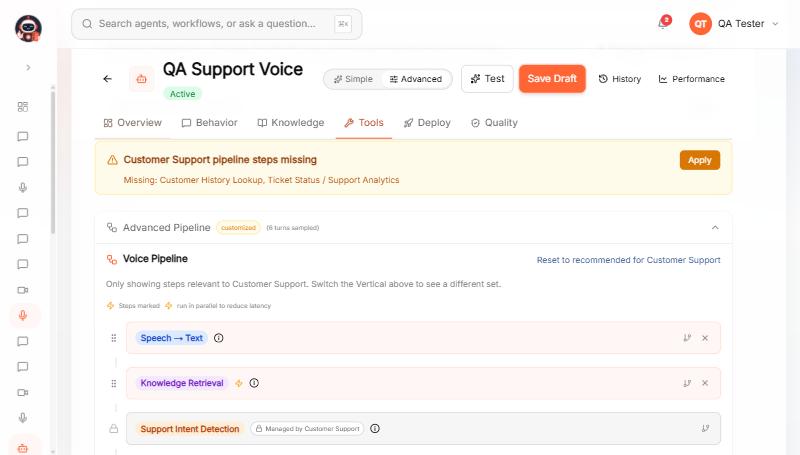
Top of the chain — note the amber banner: the editor actively checks your steps against the vertical's recommended set and offers a one-click Apply fix.
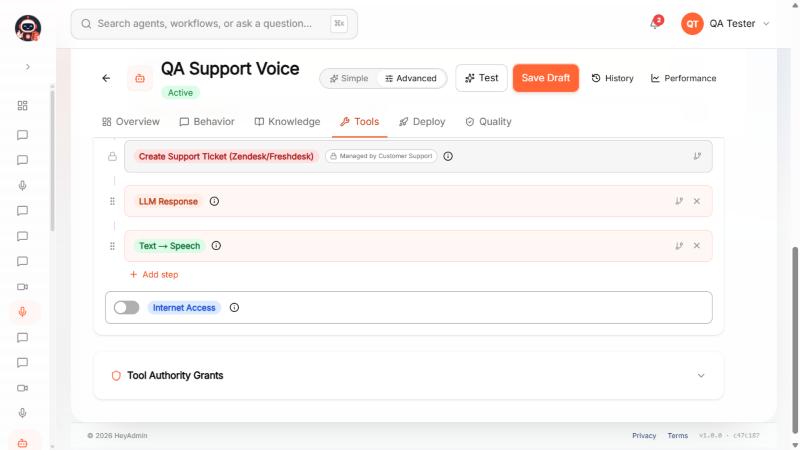
Bottom of the chain — the two 🔒 locked cards are vertical-owned; everything else is yours to reorder, delete, or add a condition to.
4. Dos and don'ts
✓ Do
Let "Reset to recommended" do the work.If your pipeline drifts from your vertical's required steps, the editor shows an amber banner with the exact missing steps and an Apply button — no need to add them by hand.
Attach/detach the knowledge base, not the step.
knowledge_retrievalis reconciled automatically fromagent.knowledgeBaseIdevery turn, regardless of what a saved Workflow row says.Expect vertical steps to keep reappearing.Steps marked 🔒 are re-spliced in by the vertical's own
buildSteps()every single turn — treat them as fixed infrastructure, not editable config.Use
skipIf/condition for real branching logic.It's the only conditional primitive the runtime supports — there's no node-graph underneath to lean on instead.Enable tools from the Agent Tools page, not the pipeline.Turning on any agent tool automatically swaps
llm_response→llm_agentfor you.
✗ Don't
Don't expect a branching canvas.
Workflow.stepsis one flat ordered array — position is the only structure there is.Don't assume Chat agents run all "5 core steps."Chat agents filter out
speech_to_textandtext_to_speechentirely — text in, streamed tokens out.Don't expect
text_to_speechon a connected D-ID video agent.It's removed from the array outright, not runtime-skipped — there's no flag to flip back on per turn.Don't add
knowledge_retrievalwithout a KB attached.In strict knowledge-only mode it will reply with an explicit "no knowledge base connected" message instead of silently ignoring the step.Don't trust "5 built-in steps" as the full picture.There are 27 registered today, the generic
intent_detectionisn't used by any default workflow, and the count has drifted before — verify, don't assume.
5. Technical requirements
Provider support for the agentic tool-calling loop (llm_agent)
Provider | Tool calling | What happens otherwise |
|---|---|---|
OpenAI | Supported | — |
Anthropic | Supported | — |
Customer-hosted (your own OpenAI-compatible endpoint) | Supported | — |
Sarvam | Not implemented | Silently falls back to deterministic |
Local / Ollama | Not implemented | Silently falls back to deterministic |
Gate checked live, per turn, by aiGateway.supportsToolCalling(agent.provider) inside llm_agent.step.js — not a static capability flag on the agent.
Retrieval tuning (env vars, all optional)
Variable | Default | Effect |
|---|---|---|
|
| Score floor for a chunk to be used; overridden per-KB by |
|
| Hard cap on retrieved context stuffed into the prompt |
|
| Below this, the transcript is dropped rather than answered |
|
| Rewrite the query as a hypothetical answer before searching |
|
| Search 3 paraphrased variants and merge results |
|
| Re-rank results for diversity instead of pure relevance |
Before you touch the pipeline editor
A knowledge base must already be uploaded and indexed for
knowledge_retrievalto do anything — attaching an empty KB just adds latency.Per-step condition editing (
skipIf/condition) needs a context field to branch on — check the step's own docstring for what it writes toctxbefore wiring a condition against it.Per-step p50/p95 latency stats in the editor are computed from real
SessionLoghistory — a freshly-published agent shows no numbers until it has real turns.human_approvalpauses every turn for a person to approve — only turn it on if an approval queue (dashboard → Approvals) is actually being watched, or every conversation will stall.Local-model routing (Tier 1) is a separate, company-level opt-in behind a quality gate (Admin → AI Layer) — it won't activate just because Ollama is reachable.
Open your own agent's pipeline
Agent → Tools tab → switch to Advanced mode → expand Advanced Pipeline. If you see an amber "steps missing" banner, that's the editor telling you something, not a bug.